

Every Startup Eventually Becomes “That One Slack Message Company”
At first, startup communication feels manageable.
You’ve got:
- Five employees.
- One group text.
- A few emails.
- Someone yelling, “Did you see my message?” across the room.
Then suddenly:
- Product decisions happen in DMs.
- HR questions disappear into random threads.
- Engineering alerts fire at 2AM.
- Nobody knows which channel anything belongs in.
- Someone uploads a contract into a meme channel called #chaos-goblins.
Just like that, Slack becomes your startup’s operational nervous system.
Which is great…right up until it becomes the place where literally everything happens.
As part of the Zarpra LaunchPad™ startup series, we’re breaking down free and startup-friendly tools that help companies grow without immediately detonating their budgets.
Now, let’s dive into Slack. The communication platform that can either:
- Streamline your startup beautifully
or - Become a searchable monument to organizational chaos.
What Is Slack?
Slack is a business communication and collaboration platform built for teams.
Think:
- Real-time messaging.
- Channels.
- File sharing.
- Voice/video huddles.
- App integrations.
- Notifications.
- Workflow automation.
- Thousands of unread messages by Thursday.
It’s essentially where modern startups live. Sometimes a little too much.
Slack’s Free Tier: Actually, Pretty Useful
Cost: Free Forever
Which is exactly the kind of pricing startups enjoy hearing during the “we’re currently paying ourselves in optimism” phase.
And honestly? Slack’s free tier is powerful enough for many early-stage startups. At least initially.
What You Get for Free
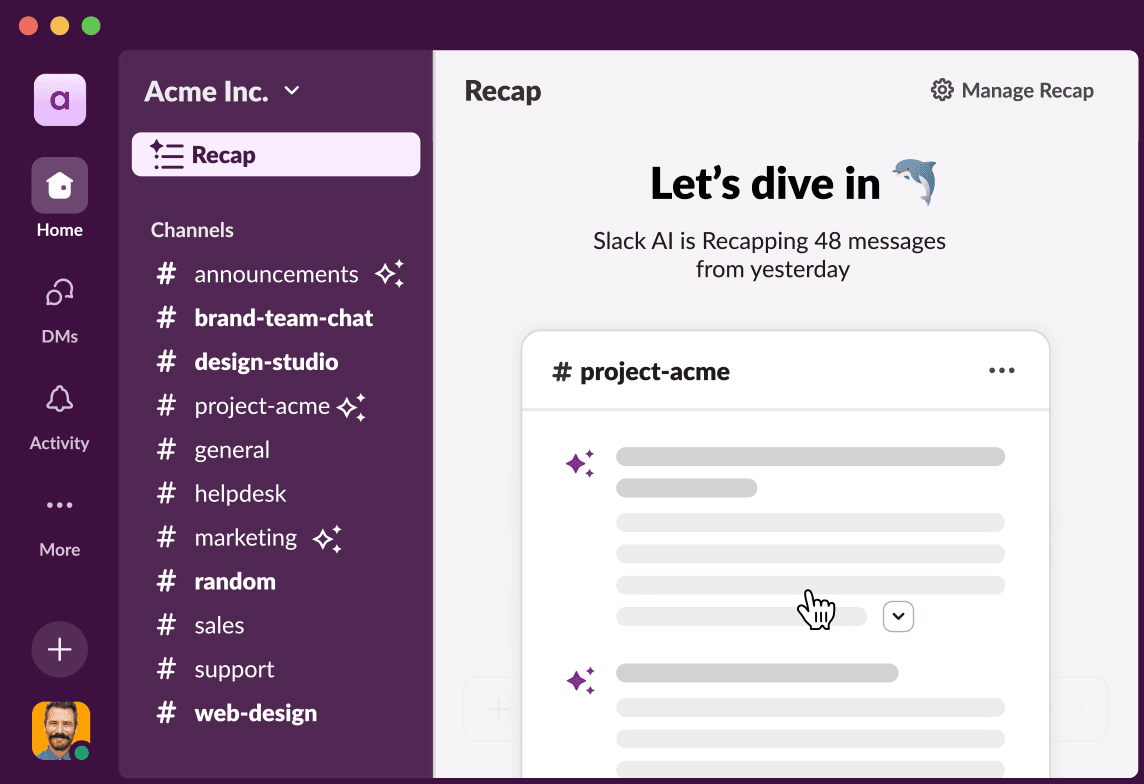
Channels for Organized Communication
Create channels for:
- Engineering
- Product
- Marketing
- HR
- Operations
- Sales
- Customer support
- Random memes employees insist are “culture.”
This alone dramatically improves communication over endless email chains.
Direct Messaging and Group Chats
Slack makes quick collaboration easy.
Which is both:
- Extremely productive
and - The beginning of “critical company decisions living inside private DMs.”
Use wisely.
App Integrations
Slack integrates with:
- Google Workspace
- Microsoft 365
- GitHub
- Jira
- Confluence
- Zoom
- Salesforce
- PagerDuty
- Pretty much every SaaS platform startup eventually collects like Pokémon.
This is where Slack becomes incredibly powerful. And where startups accidentally connect 37 apps nobody manages.
Huddles and Lightweight Calls
Need a quick conversation? Slack Huddles make it easy to jump into:
- Voice calls
- Quick troubleshooting
- Team discussions
- “Can someone explain what broke production?” sessions
Without scheduling a formal meeting, nobody wanted to.
Searchable Communication
Slack’s search functionality is one of its biggest strengths.
Instead of: “Does anyone remember where that spreadsheet is?”
You can actually search:
- Messages
- Files
- Links
- Conversations
- Shared content
Which is significantly better than: “Pretty sure someone posted it sometime in February.”
Why Startups Love Slack
It Centralizes Communication
Slack becomes the company’s operational hub.
Teams can collaborate faster across:
- Departments
- Time zones
- Projects
- Incidents
- Product launches
Especially important once startups go remote or hybrid.
It Reduces Email Overload
Nobody wants:
- 47 internal emails
- endless reply-all chains
- “per my last email.”
energy
Slack makes communication faster and more natural. Which startups love because speed matters.
It Integrates Into Everything
Slack becomes more than messaging.
It becomes:
- Alerting
- Workflow approvals
- Monitoring
- Incident response
- Task notifications
- Ticketing integrations
- Automation triggers
This is why startups adopt it so aggressively.
It Helps Build Culture
For remote startups, especially, Slack becomes part of the company culture.
Channels for:
- wins
- launches
- birthdays
- pets
- memes
- random hobbies
…can genuinely improve team connection.
As long as someone eventually explains why there are eleven different GIF channels.
The Free Tier Limitations Startups Need to Understand
Now for the important part. Slack Free is great. But there are limitations startups should understand BEFORE they accidentally operationalize their entire company around it.
Message History Limits
This is the big one.
Slack Free only provides access to: the most recent 90 days of message history. Older messages? Gone from searchable access unless you upgrade.
Meaning:
- Decisions disappear
- Documentation disappears
- Shared files disappear
- “Important conversations” vanish into the void.
Every startup discovers this limitation emotionally. Usually at the worst possible moment.
Limited File Storage
Free Slack workspaces have strict file storage limitations.
And startups LOVE uploading:
- Screenshots
- PDFs
- Product mockups
- Contracts
- Training docs
- Random giant video files nobody compresses
Storage disappears quickly.
Limited Integrations
Slack Free restricts the number of app integrations available. This becomes painful once startups begin scaling workflows and automation.
Because eventually everyone wants:
- Jira integration
- Google Drive integration
- CRM alerts
- Monitoring alerts
- Ticketing integrations
- CI/CD notifications
…and suddenly the free limits start feeling very small.
No Advanced Security Features
Free Slack lacks many enterprise-grade controls, including:
- Advanced SSO.
- Expanded audit logs.
- Advanced compliance features.
- Granular security management.
For tiny startups? Probably okay.
For startups handling:
- customer data.
- regulated environments.
- enterprise clients.
- compliance audits.
…it becomes a concern pretty quickly.
Slack Can Accidentally Become “Everything”
This is the biggest startup danger.
Slack slowly becomes:
- documentation
- ticketing
- approvals
- incident management
- HR discussions
- project tracking
- knowledge management
- company memory
And eventually:
Nobody can function if Slack goes down.
That’s not operational maturity. That’s dependency.
At Zarpra LaunchPad™, we help startups build healthy operational structures where:
- Slack handles communication.
- Confluence handles documentation.
- Jira handles project management.
- Systems have clear ownership.
- Processes scale properly.
Because “everything in Slack” becomes chaos surprisingly fast.
Vendor Lock-In Happens Here Too
Slack becomes deeply embedded in startup operations.
Especially once teams rely on:
- integrated workflows.
- automation.
- notifications.
- app ecosystems.
- approval systems.
- operational alerts.
Migrating later becomes painful. Not impossible. Just painful enough to make founders avoid thinking about it.
Which is why startups should:
- document processes outside Slack.
- avoid over-centralization
- plan for scaling costs.
- Understand upgrade pricing early.
Future-you will appreciate it.
Our Recommendation
For startups? Slack Free is honestly one of the best operational tools available.
Especially for:
- Remote teams.
- Fast-moving startups.
- Collaborative teams.
- Technical organizations.
- Cross-functional communication.
Just remember: Slack is a communication platform.
Not your:
- documentation platform.
- project management system.
- compliance archive.
- file server.
- operational source of truth.
That’s how startups accidentally create digital spaghetti.
How Zarpra LaunchPad Helps
At Zarpra LaunchPad™, we help startups:
- Structure Slack environments properly.
- Secure communications.
- Implement startup-friendly governance.
- Configure integrations safely.
- Avoid operational chaos.
- Build scalable collaboration environments.
Without turning Slack into an unmanaged notification apocalypse.
Because startups should move fast…Don’t spend six hours trying to figure out why every channel is getting duplicate GitHub alerts.
Coming Next in This Series
Jira Service Management for Startups
We’ll cover:
- The free tier for small teams.
- Startup helpdesk basics.
- Internal IT request management.
- Customer support possibilities.
- Automation features.
- Hidden upgrade costs.
- Why does “just message IT in Slack” stop working very quickly?
Because eventually, every startup realizes: If support requests live entirely in DMs… nothing actually gets tracked.